AI
Published : 19.08.2026
A young woman in Helsinki who finished vocational training last year wants to open a small ethnic grocery shop in her neighborhood. Her first questions cut across half a dozen domains at once: What permits a food business needs in Finland? Whether her residence permit allows self-employment? How to prepare a valid business plan? Is there any financial support for entrepreneurs in Finland?
These questions are the everyday starting point for the learners that the UPBEAT — Upskilling Immigrants for Business Planning and Entrepreneurship using AI Technologies worked with from August 2024 to January 2026.
The project ran a six-week hybrid training programme, the Start Smart, five times across 2025 and built a dedicated set of AI tools to support it. This article describes three of those tools, while a companion article by Mäkeläinen (2025) covers the related custom GPTs. The closing section of this article offers a more general lesson on building customised AI tools and choosing between the different ways to implement them. Readers planning similar work may find this the most transferable part.
Learners used general-purpose AI assistants such as ChatGPT throughout Start Smart, and those tools handle much of the work well. But two gaps mattered. First, the tools do not restrict their answers to the carefully selected official sources that immigration, taxation, business registration, and licensing questions demand. Second, they do not know the course context unless it is supplied every time — a learner’s starting level, what the previous module covered, what the next session will teach, which resources the team recommends, or how a learner’s background, language level, and business idea should shape their preparation. The UPBEAT-project built its custom tools to close the two gaps, as a complement to general-purpose AI rather than a replacement for it.
The Start Smart programme and its AI tool ecosystem
Start Smart training programme helped immigrant and refugee learners move from an initial business idea toward a more developed, AI-supported business plan. The course combined an online kick-off, four 3-hour learning sessions, optional webinars, industry-specific future guides, and a final cross-border online hackathon run by Haaga-Helia.
Rather than treating AI as a separate topic, the programme embedded it across the entrepreneurial journey, as learners first built basic AI and prompting skills, then applied AI to market understanding, business planning, industry analysis, marketing, and future-proofing. Two courses ran in Finland with Startup Refugees and three in Estonia with the Estonian Refugee Council, and graduates received a diploma and an open badge from Haaga-Helia.
The programme drew on two types of tools. The first type is custom-made tools developed within the UPBEAT project:
- The Learning Assistant, which produces a personalised learning plan to prepare each learner for upcoming sessions .
- The Smart Guide, which answers country-specific regulatory and business questions from a curated, trusted knowledge base.
- The Business Assistant, a pair of resources — custom GPTs (Business Plan Coach and Future Proof Mentor, covered in Mäkeläinen 2025) and a Prompt Library of business-task prompt templates — for the recurring business tasks learners face during and after the course.
The second type is general AI assistants and tools such as ChatGPT, Microsoft Copilot, Google Gemini, NotebookLM, Adobe Firefly, used for open-ended exploration, drafting, and structuring ideas. All of the tools were taught and used during the Start Smart programme, so that learners left able to work with them independently.
Learning Assistant: personalised preparation between sessions
The Learning Assistant is a small web application that produces a personalized ‘Smart learning plan’ before each scheduled course event, including onboarding, Module 2, Module 3, Module 4, and the hackathon, based on what the system already knows about the learner from their application form.
When a learner applies to Start Smart they fill in an extended profile form: demographics, language proficiency, prior education, work experience, self-rated entrepreneurship competencies across eight dimensions (generative AI skills, market analysis, creating business ideas, making a business plan, running a business, branding and marketing, sales, future thinking), plus their planned business idea and motivation for joining the course. The Learning Assistant treats that form as the input to a tailored learning-plan generator, and it supports the learner across two phases.
The first phase is before training (onboarding). Here the purpose is to bring every learner in the group up to a minimum basic level of entrepreneurship knowledge. The Learning Assistant draws on a curated list to produce personalised recommendations covering three things:
- Topics each learner should upskill on.
- Learning resources for each topic.
- Learning tips for each topic.
These recommendations also address the business terms and tools that the training programme will use, such as PESTEL analysis and customer personas, so that learners arrive already familiar with the vocabulary.
The second phase is during training. Here the purpose shifts to personalising the learning experience, providing additional materials, and deepening knowledge. Following a flipped-classroom approach, the Learning Assistant produces personalised preparatory recommendations of two kinds:
- Personalised learning objectives that are industry-focused and shaped by the learner’s preferences.
- Personalised prep assignments that are likewise industry-focused and preference-aware, tied to the techniques the upcoming module will teach (PESTEL, customer personas, SWOT, business modelling).
Smart Guide: a curated answer engine for Finnish and Estonian rules
The Smart Guide answers the practical regulatory and procedural questions that immigrant entrepreneurs face early: taxation, immigration status, business registration, sectoral licensing, employment law, IP, GDPR, and restructuring. Instead of leaving learners to search across scattered websites or rely only on a general chatbot, the Smart Guide gives them a structured way to ask country-specific questions and receive answers grounded in trusted sources.
The Smart Guide helps learners get answers from the most appropriate source, instead of giving the same type of response to every question. The core idea is that the tool does not answer from a general model’s open-ended knowledge, as it answers from a predefined, curated knowledge base of trusted material that the project team has selected in advance (Picture 3).
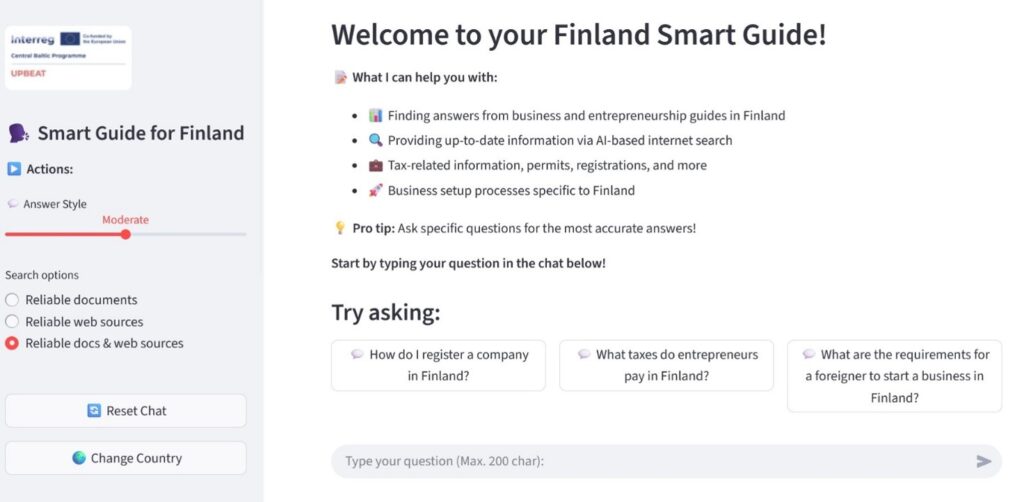
Picture 1. Smart Guide user interface and the core functionality
Taking Finland as an example, the learner can choose between three options: answers drawn from curated entrepreneurship documents, answers from trusted online sources, or a combination of both. The document-based option is useful for stable guidance, such as business planning concepts or general entrepreneurship support. The web-based option is useful when the question may depend on current rules, fees, tax rates, permits, or official instructions. The hybrid option combines both perspectives when the learner needs a broader answer.
Learners can also choose how much detail they want: a short answer, a moderate explanation, or a more detailed step-by-step response. (For a detailed account of the underlying architecture, see Khan 2025.)
The Smart Guide answers only from the curated knowledge base, never the open web. It also makes sources visible so learners can verify an answer, as document-based answers carry inline citations (document name and page number), and web-based answers include clickable links. Educators keep the collection current by adding, updating, or removing source materials (the technical mechanics are described in Khan 2025). To strengthen sectoral answers, the team curated an additional service-business resource set covering eight industry verticals in Finland and seven in Estonia.
The same approach transfers to an enterprise setting: an organisation could point the Smart Guide at its own internal documents (policies, handbooks, procedures) for employees to get answers grounded in approved sources rather than a general model’s open-ended knowledge — with every answer traceable to a known document.
The same underlying idea of grounding generative AI in an organisation’s own trusted knowledge has been explored in an enterprise context by Khan, Kudryavtsev & Kauttonen (2024) and integrated into the GAIK toolkit (Kudryavtsev et al. 2026).
Prompt Library: a reusable shelf of business-task prompts
The Prompt Library is a categorized, searchable collection of ‘power prompts’ for common entrepreneurship tasks, such as Blue Ocean Strategy ideation, business idea generation, identifying industry trends, trend impact analysis, identifying key competitors, analyzing competitor strengths, feasibility evaluation, customer sentiment analysis, and defining a target audience. Each prompt is a templated paragraph that the learner adapts and runs in a general-purpose AI assistant.
Each entry in the library has a name, the prompt text itself with placeholders like [INDUSTRY/NICHE], [TARGET DEMOGRAPHIC], [NUMBER], and one or more category tags reflecting the entrepreneurship topic it addresses (Business Strategy, Market Analysis, Branding). Because every prompt is tagged this way, learners find what they need by filtering the collection by topic rather than scrolling through the whole list, and educators can add or revise prompts as the curriculum evolves. A learner working on competitor analysis, for example, filters by Market Analysis, picks ‘Identifying Key Competitors’, fills in their industry and target demographic, and runs the result against ChatGPT.
The library could be implemented in several ways, as the project hosts it in Airtable, an online tool that combines the simplicity of a spreadsheet with the structure of a database, because it offers strong search and filtering out of the box and lets educators maintain the prompts without engineering support (Picture 2).
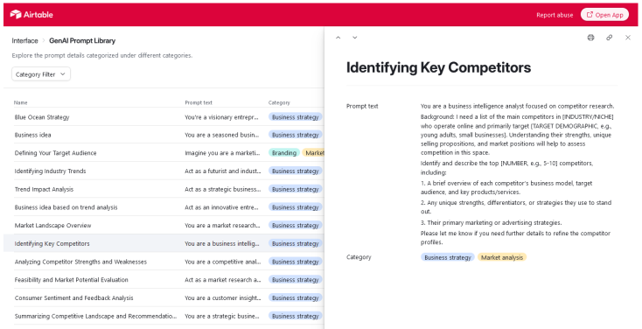
Picture 2. Prompt Library for entrepreneurship and business planning
The Prompt Library and the custom GPTs are the two components of the Business Assistant and they work together as complementary parts of it rather than as separate tools. Within that pairing they serve two different uses.
- The custom GPTs (covered in Mäkeläinen 2025) embody an opinionated coaching workflow, where the Business Plan Coach walks the learner through company details, business concept, market analysis, operations and finance in order, while the Future Proof Mentor introduces PESTLE, the Four Futures model and 2×2 scenario matrices.
- The Prompt Library is more granular: the learner picks the specific task they need help with, gets a starting prompt, and iterates.
How we tested the tools and what learners reported
The evaluation combined two streams: a formative round of user-based testing on the tools alone before the first cohort, and post-course participant surveys at the end of each pilot.
Formative testing (March 2025, n=8)
Eight testers used each of the three tools and answered a fixed Likert questionnaire covering perceived usefulness, perceived ease of use, and behavioural intention to use, plus an open-text section per tool. The point of this round was not to validate the tools but to find what to fix.
The Smart Guide drew the most actionable feedback: a quarter of testers were neutral on whether the answer-style options were helpful (the answer-style slider was added afterwards as a result), several flagged that conversation history was missing, one summed up the experience as ‘feels like it would only answer to the right-formatted questions’.
The Learning Assistant tested cleanly on usefulness and clarity but raised a UX request and a mobile-responsiveness gap. The Business Assistant components tested as the closest in feel to ChatGPT itself, which raised the design question of how much specific value a wrapper around ChatGPT adds over teaching learners to prompt ChatGPT well.
Feedback from real use by 100+ learners
Beyond the small formative round, the tools were used by the full cohorts of learners across the five courses, and feedback was collected from that real use through structured end-of-course surveys (n=76: 16 from Estonia and 14 from Finland after the spring cohort, then 32 from Estonia and 14 from Finland after the autumn cohort).
The surveys covered satisfaction with the programme overall, likelihood to recommend, and the perceived usefulness and ease of use of each tool individually: project-team retrospectives in Tallinn (August 2025) and Helsinki (December 2025), steering-group meetings, and a quality-assurance expert added qualitative context.
The usefulness of all custom tools was rated highly, in the 4.1–4.5 range across cohorts (5.0 – max), with ease-of-use scores in the 4.2–4.7 range (5.0 – max). Most tools improved slightly from spring to autumn: after onboarding materials for learners and trainers were improved the Learning Assistant rose from 4.2 to 4.3, the Prompt Library from 4.1 to 4.3, and the Smart Guide showed the largest improvement, from 4.2 to 4.5, making it the highest-rated tool in Autumn 2025, while the custom GPTs remained stable at 4.3.
Worth noting, ChatGPT Plus subscription consistently scored at or above the custom tools – 4.6 in Spring 2025 to 4.7 in Autumn 2025. An honest signal that for many tasks and publicly available sources, a well-prompted general model does most of what a learner needs.
Participant interviews published by the programme add texture to these numbers (Lappalainen 2025). One learner singled out the Prompt Library for improving his prompt-writing and for teaching him how to customise ChatGPT for professional use, two valued the Smart Guide for answering from reliable sources and linking to trusted English-language guidance, which matters for newcomers who do not yet read Finnish fluently.
The main improvement request was a single, searchable place to find the right tool or prompt for a given stage of business development — a discoverability problem rather than a shortcoming of any individual tool.
What we learned, and where the limits are
Four lessons stand out from building and running the tools.
- Building AI tools for teaching and learning demands tight collaboration between trainers and AI solution creators. A tool’s behaviour is driven less by the technology than by the pedagogy it has to serve. The Learning Assistant is the clearest case, as its design was shaped mainly by the training methods and assignments around it, and adopting a flipped-classroom approach with pre-assignments changed the tool substantially. Decisions about teaching come first, and the tool is built to fit them, not the other way around.
- Custom tools age fast and need constant upkeep. The team’s retrospective on the autumn cohort noted how quickly the tools became outdated. Base models, vendor UIs, and prompting conventions all change, so any custom layer needs frequent maintenance to stay aligned.
- Weigh the implementation options before defaulting to code. A customised tool does not always have to use coding: custom GPTs can be configured in ChatGPT, task-specific assistants assembled in Microsoft Copilot Studio, or a curated knowledge base maintained in NotebookLM — low-effort routes that trade some control over behaviour and data. When control, scalability, and precise handling of inputs and outputs are what the task demands, a code-based solution earns its extra effort. The point is to weigh each option against the requirements rather than assume one is always right.
- A custom tool’s real value is its content and context, not its model. The Smart Guide is only as good as its curated source list. Keeping knowledge sources, course context, and prompts current is the actual ongoing work, and whoever inherits the tool inherits that curation burden.
Conclusion and transferability
In the UPBEAT-project, we built four customised AI tools around the Start Smart programme. Each tool addressed a distinct learner need that a general chatbot could not meet on its own, and it was the combination, rather than any single tool, that learners responded to. Looking beyond UPBEAT, these tools also illustrate a more general point, that there is more than one way to create a customised AI tool, and the four built here did not all follow the same recipe.
A customised AI solution can be implemented along a spectrum of three approaches, each with its own balance of effort and control.
- A general-purpose AI assistant with prompt templates (such as ChatGPT, Copilot, or Gemini) needs zero setup and is flexible and easy to experiment with, but offers limited control and cannot be automated.
- No-code AI agent builders (such as custom GPTs in ChatGPT or Microsoft Copilot Studio) give more tailored behaviour at low development cost and stay easy to maintain, at the price of limited automation, less control, and some vendor lock-in.
- A code-based solution using an API offers the most scalability and the most precise control over inputs, outputs, and workflow, but requires some software development skills to build and deploy.
In short, control and scalability rise as one moves down the list of implementation approaches, while ease of setup and maintenance falls.
In UPBEAT, we used all three approaches. The Prompt Library represents the first approach of a general-purpose assistant paired with prompt templates, the custom GPTs are created with no-code AI agent builders, and the Learning Assistant and Smart Guide are code-based solutions built on an API.
There is no single best approach — the right choice for a given custom tool should be driven by the requirements it must meet and the capabilities already available to the team building it.
The Upbeat – Upskilling Immigrants for Business Planning and Entrepreneurship using AI Technologies project is an initiative funded by the Interreg Central Baltic region programme aimed at upskilling young immigrant entrepreneurs in Finland and Estonia. In cooperation with StartUp Refugees and Estonian Refugee Council, the project seeks to address the unique challenges faced by aspiring business owners and unlock their entrepreneurial potential.

References
Khan, U.A., Kudryavtsev, D. & Kauttonen, J. 2024. Enhancing generative AI for accessing enterprise knowledge. eSignals PRO, Haaga-Helia University of Applied Sciences. Accessed: 18.8.2026.
Khan U.A. 2025. Developing an AI-Powered Smart Guide for Business Planning & Entrepreneurship. Towards Data Science. Accessed: 18.8.2026.
Kudryavtsev, D., Khan, U. A., Remes J., Kauttonen J. 2026. Reuse and guidance for generative AI solution development and implementation: Knowledge management perspective. In: Barateiro, J., Rivkin, A., Zdravkovic, J., Borbinha, J., Mira da Silva, M. (eds) Enterprise Design, Operations, and Computing. EDOC 2025 Workshops . EDOC 2025. Lecture Notes in Business Information Processing, vol 571. Springer, Cham. pp 70–83
Start Smart Training Program (UPBEAT). 2025. Library of Open Educational Resources.
Mäkeläinen, J. 2025. AI-enhanced coaching for young immigrant entrepreneurs: the role of custom GPTs. eSignals PRO, Haaga-Helia University of Applied Sciences. Accessed: 18.8.2026.
Lappalainen N. 2025. AI tools and networking boost young newcomers in Finland and Estonia. Central Baltic Programme, project news.
The authors used ChatGPT and Claude to draft initial versions of the text, working from a structure and from existing project materials that the authors supplied for each section, and to condense the text and suggest improvements. All substance, findings, and conclusions were verified, edited, and approved by the authors, who take full responsibility for the content.
Picture: Shutterstock